


In This Guide
Shout For Shout (SFS) just got a whole lot easier. SFS Link Sharing is a new feature inside ShareYourFans™ that allows you to generate a unique invite link for your SFS listing. You can share this link anywhere — DMs, socials, bios, group chats — and creators who click it can instantly view your stats, requirements, and send you an SFS request.
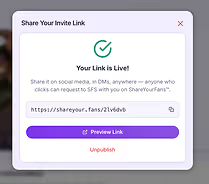
No more awkward cold DMs. No more back-and-forth explaining your stats. No more guessing if someone is legit. No more wondering if someone is reputable.
This post walks you through what SFS Link Sharing is, why it matters, and exactly how to use it to attract the right SFS partners quickly and professionally.
Who is This Feature For?
This feature is perfect for creators who:
- Are tired of repeating their stats and requirements in DMs
- Want higher-quality SFS requests from creators who actually match their criteria
- Care about professionalism, efficiency, and saving time
- Want to avoid spammy or mismatched shoutout requests
If you’ve ever felt overwhelmed by cold DMs or frustrated by SFS requests that don’t align with your audience, SFS Link Sharing was built for you.
What Is SFS Link Sharing?
SFS Link Sharing is a tool inside ShareYourFans™ that lets you generate an invite link connected directly to your
SFS listing. This link acts as a one-stop listing for other creators interested in swapping shoutouts with you.
When someone clicks your SFS invite link, they see:
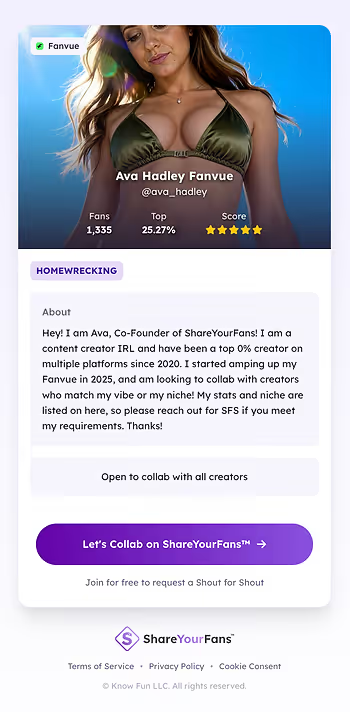
- Your profile name, avatar, and username
- Your verified fan count and top percentage ranking
- Your review star rating from other creators
- Your SFS preferences and requirements
- A clear call-to-action to send you an SFS request instantly
This means creators no longer need to ask for your stats or details in direct messages. They get all the information upfront and can submit a request right away within ShareYourFans™
Why SFS Link Sharing Matters
Creators shared common frustrations before this feature existed:
- Repeating stats and requirements multiple times in DMs
- Receiving requests from creators who don’t meet their criteria
- Losing track of SFS swaps or forgetting to follow up
- Spending time manually vetting potential partners
SFS Link Sharing addresses these issues by making the process transparent, organized, and professional. It saves time, reduces misunderstandings, and helps you build better collaborations with creators who truly match your audience and style.
What This Looks Like in Practice
Before SFS Link Sharing, creators often had to send multiple DMs, answer the same questions repeatedly, and still decline requests that weren’t a good fit.
With an SFS invite link, creators can review your stats and requirements before reaching out. If they don’t meet your criteria, they simply don’t send a request. And if they do, the conversation starts already aligned.
The result? Fewer messages, better matches, and more efficient collaborations.
Where to Create Your SFS Link

To start using SFS Link Sharing, you need to generate your unique invite link inside your ShareYourFans™ account. Here’s how:
- Log in to your ShareYourFans™ account and navigate to your SFS listing.
- Look just above your profile photo for a banner that says “Get even more SFS partners.”
- Click the Create Link button to begin generating your personalized SFS invite link.
This banner is easy to spot and designed to encourage you to expand your SFS network with minimal effort.
Creating Your SFS Link for the First Time
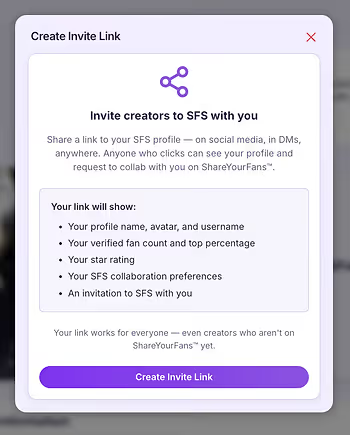
When you click Create Link for the first time, a popup titled “Invite Creators to SFS With You” will appear. This screen explains exactly what information your link will display to other creators, including your stats and preferences.
After reviewing the details, confirm to generate your unique invite link. This link is now ready to share anywhere you want to find new SFS partners.
How to Share Your SFS Invite Link Effectively
Once your SFS invite link is created, the next step is sharing it strategically to attract the right creators. Here are some practical ways to use your link:
- Direct Messages (DMs): Instead of typing out your stats, send your invite link to creators interested in SFS. This saves time and provides clear info upfront.
- Social Media Bios: Add your SFS invite link to your Instagram Posts, Bluesky Threads, or Twitter Communities to let followers know you’re open for shoutouts.
- Group Chats: Share your link in creator communities or niche groups where members seek SFS partners.
- Content Captions: Include your invite link in post captions or stories to reach a wider audience actively engaging with your content.
By placing your link in multiple places, you increase your chances of connecting with creators who fit your criteria and want to collaborate.
Managing Incoming SFS Requests
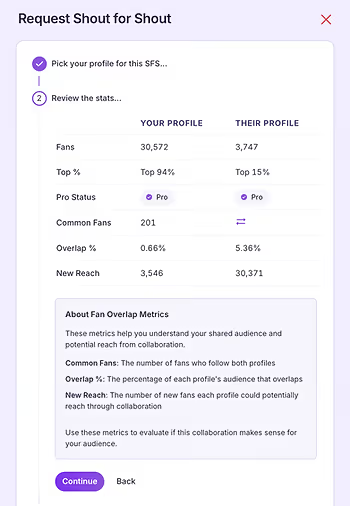
When creators click your invite link and send an SFS request, you can manage these requests directly inside ShareYourFans™. The platform organizes all incoming requests in one place, making it easy to:
- Review the requester’s profile and stats
- Accept or decline requests based on your preferences
- Keep track of scheduled shoutouts and follow-ups
- Bonus: If both creators have ShareYourFans™ Pro, they can see their fan overlap, which gives more detailed insights into whether or not the SFS is beneficial.
This centralized system prevents missed swaps and keeps your SFS collaborations on track.
Common Mistakes to Avoid With SFS Invite Links
To get the best results from SFS Link Sharing, avoid these common pitfalls:
- Sharing your link without keeping your stats and requirements updated every 30 days
- Forgetting to check incoming SFS requests regularly
- Posting your link once and never resurfacing it
Treat your SFS invite link as an active tool — the more consistently you use and maintain it, the better your results will be.
Tips for Optimizing Your SFS Listing
To make the most of SFS Link Sharing, ensure your SFS listing is clear and appealing:
- Keep your stats updated: Accurate fan counts and ratings build trust.
- Specify your SFS requirements: Be clear about follower ranges, content style, or engagement expectations.
- Use a friendly profile photo and username: This helps creators recognize and remember you.
- Respond promptly to requests: Timely replies encourage more collaborations.
A well-maintained listing attracts serious creators and improves your chances of successful shoutouts.
Common Questions About SFS Link Sharing
Can I edit my SFS listing after creating the invite link?
Yes, any updates to your SFS listing automatically reflect when others view your invite link.
Is the invite link permanent?
Your unique link remains active unless you choose to deactivate it in your ShareYourFans™ settings. You can always re-enable the link again in the future (it will always be the same link from when you first create it).
Final Thoughts
SFS Link Sharing puts you back in control of your collaborations. You decide who you work with — the invite

link simply brings the right creators directly to you. With just a few clicks, you can streamline your SFS process and focus on partnerships that actually benefit your growth.
If you’re tired of repeating yourself, vetting mismatched SFS requests, or dealing with chaotic shoutout swaps, SFS Link Sharing was built for you. ShareYourFans™ makes SFS collaborations organized, transparent, and actually worth your time — and you can get started for free.
👉 Sign up now at ShareYourFans.com. It’s free, and it’ll save you hours.
Run your first trackable
GG swap
Generate unique links, see real-time clicks, and prove ROI on every swap.
No card required · Free forever