


In This Guide
If you've ever caught yourself thinking "Wait… who's posting me today?" or "Did they actually follow through on that SFS?" — you're not alone. For content creators, managing Shout For Shout collaborations can quickly spiral into chaos. Between juggling DMs across multiple platforms, maintaining notes apps, taking screenshots of agreements, and updating spreadsheets just to keep track of who's doing what — it's exhausting.
The mental load alone can take you away from what you actually want to be doing: creating content.
That's exactly why we built the SFS Activity Dashboard on ShareYourFans™. It's designed to eliminate the guesswork, reduce the back-and-forth, and give you complete visibility into every collaboration you're involved in.
What Exactly Is an SFS, and Why Does It Matter?
Before we dive into the dashboard, let's quickly cover the basics for anyone new to the creator economy.
SFS stands for "Shout For Shout" — a mutual promotion strategy where two creators agree to share each other's content with their respective audiences. When done right, SFS is one of the most effective (and free) ways to grow your following organically. You're essentially trading exposure with another creator who has a similar audience size or niche.
The challenge? Keeping track of these agreements. When you're doing multiple SFS collaborations per week — or even per day — things can slip through the cracks. Did your partner actually post? Did you remember to post for them? What time did you agree on? Which account were you supposed to tag? Did your partner delete the post early?
This is where most creators hit a wall. And this is exactly the problem the SFS Activity Dashboard solves.
Your New Command Center for Collaborations
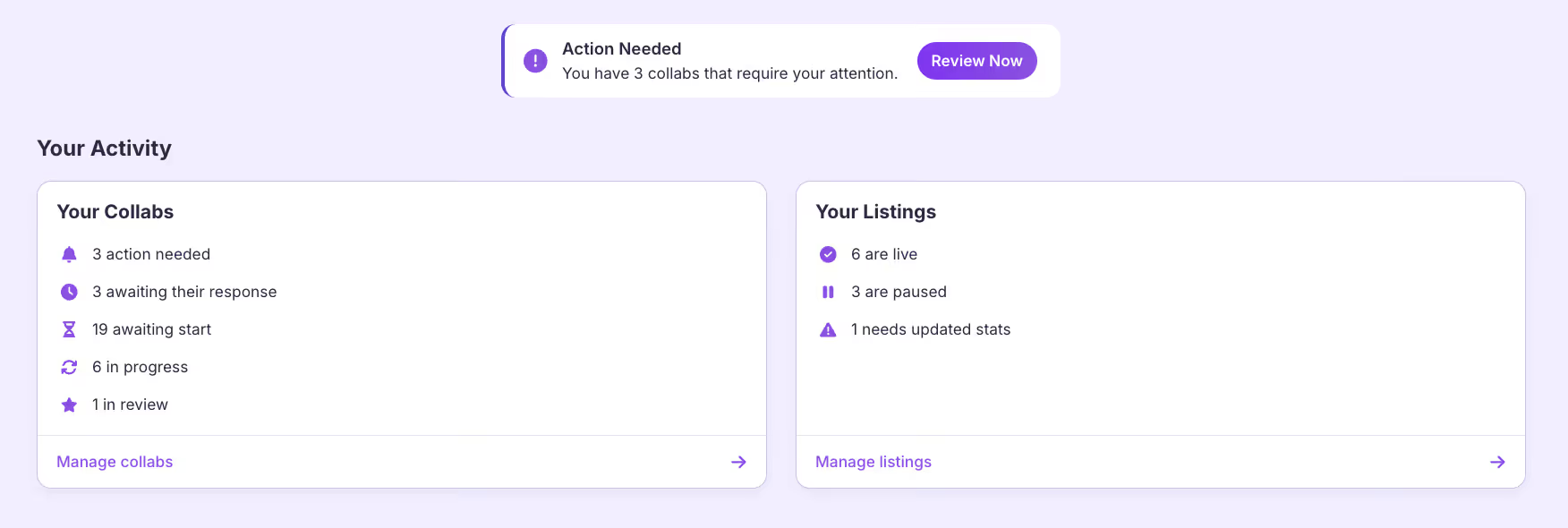
The SFS Activity Dashboard is your one-stop hub for everything SFS-related. Think of it as mission control for your collaborations. Instead of bouncing between platforms trying to piece together the status of your collabs, everything lives in one clean, organized view.
The dashboard provides real-time updates of every SFS you're involved in — so nothing slips through the cracks. It also gives you an at-a-glance view of your SFS Listings and their current status, making it easy to manage your availability and track your collaboration history.
How to Access the Activity Dashboard
You can find the Activity Dashboard directly inside your free ShareYourFans® account. The process is simple:
First, log into your ShareYourFans® account. Then click the "Shout For Shout" tab in the main navigation. Your dashboard will display on screen immediately. From there, you can drill down further by clicking either "Manage Collabs" to see your active and past collaborations, or "Manage Listings" to manage the SFS opportunities you've posted.
No complicated setup required. No premium features locked behind a paywall for basic functionality. The dashboard is available to every creator with a free account.
Understanding the "Your Collabs" Section
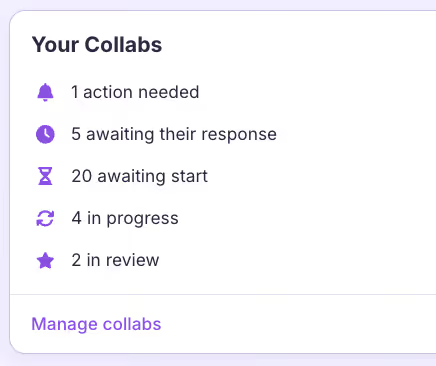
The Your Collabs section is where you'll spend most of your time. This is your real-time view of every SFS you're participating in, whether you initiated it or someone else did.
Each collaboration is displayed with a status icon that represents a different stage in the process. At a glance, you can see which collabs are awaiting response, which are currently in progress, and which have been completed. This visual system means you always know exactly where things stand without having to open DMs or scroll through message history.
Why does this matter? Because one of the biggest frustrations creators face is uncertainty. Did they see my message? Are they still planning to post? Should I follow up or would that seem pushy? The Your Collabs section eliminates this anxiety by giving you objective, real-time status updates.
You can also use this section to identify patterns over time. Which creators consistently follow through? Who tends to ghost or delay? This information is invaluable for building a network of reliable collaboration partners.
Understanding the "Your Listings" Section
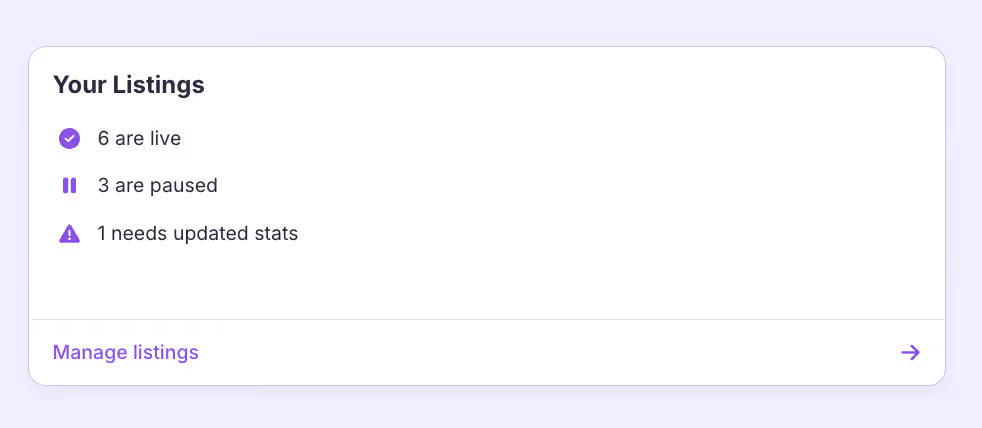
The Your Listings section focuses on the SFS opportunities you've created and posted for other creators to find.
Here, you can see how many of your listings are currently live and visible to other creators, which listings you've paused (maybe you're taking a break or your schedule is full), and if any listings need updated stats to remain accurate and appealing.
Keeping your listings current is crucial. Other creators make decisions about whether to collaborate with you based on the information in your listing. Outdated stats or inactive listings can hurt your credibility and reduce the number of quality collaboration requests you receive.
The dashboard makes it easy to maintain your listings without having to dig through menus or remember when you last updated something.
Why the Activity Dashboard Saves You Time
Let's talk about the time savings in concrete terms.
Without a centralized dashboard, managing SFS typically looks like this: You check your DMs on one platform to see if someone responded. You open your notes app to remember what you agreed to. You scroll through screenshots to find the specific terms. You update a spreadsheet to track completion. You repeat this process for every single collaboration.
This fragmented approach is not only time-consuming — it's mentally draining. Every time you context-switch between apps, you lose focus and energy.
The Activity Dashboard replaces all of that with one clean view. Less checking. Less mental load. More time actually creating content.
For creators who do multiple SFS collaborations per week, this can translate to hours saved. Hours you can reinvest into creating better content, engaging with your audience, or simply taking a well-deserved break.
Why This Beats Using Notes Apps and Spreadsheets
You might be thinking: "I've been using notes apps and spreadsheets for years. They work fine."
And sure, they can work — to a point. But here's the thing: notes apps and spreadsheets weren't built for collaboration tracking. They're static tools being forced into a dynamic use case.
Notes apps can't update automatically when something changes. They can't show you real-time SFS progress. They can't track multiple creators at once in a meaningful way. They can't alert you when someone completes their end of the deal. And they definitely can't help you identify which creators are reliable partners over time.
The SFS Activity Dashboard was purpose-built for this exact workflow. It keeps everything live, organized, and accurate — all in one place. No manual updates required. No copy-pasting between apps. No wondering if your information is current.
What Makes ShareYourFans® SFS Different
The Activity Dashboard is powerful, but it's just one piece of what makes ShareYourFans® different from other collaboration methods.
When you use SFS through ShareYourFans™, you're working with verified creators. This means the person you're collaborating with has been confirmed as a real creator with an active audience. No bots. No fake accounts. No wasted time on collaborations that go nowhere.
Stats are updated within 30 days, so you know the follower counts and engagement rates you're seeing are current and accurate. This helps you make informed decisions about who to collaborate with.
Every listing has clear requirements spelled out upfront. There's no ambiguity about what's expected from each party. This reduces misunderstandings and sets both creators up for success.
Real reviews from other creators help you identify reliable partners. You can see who has a track record of following through and who tends to flake.
Built-in accountability means there's a record of every agreement. This isn't about being punitive — it's about creating a culture where creators can trust each other.
And perhaps most importantly: it's free for creators. The basic functionality you need to find partners, manage collaborations, and track your activity doesn't cost anything.
Taking It Further with ShareYourFans® Pro
For creators who are ready to scale their collaboration strategy, ShareYourFans® Pro takes the Activity Dashboard to the next level.
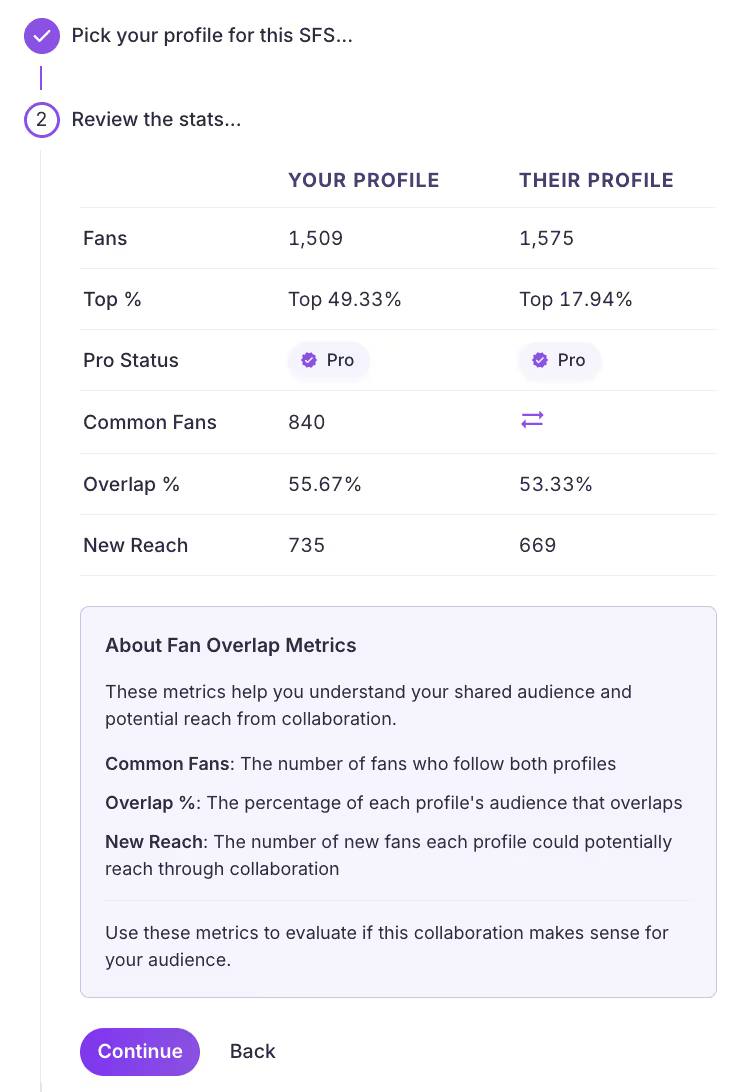
With ShareYourFans® Pro, both users can actually view fan % overlap between their pages. This helps creators make more informed decisions on who they should collaborate with based on their potential new reach from the collab.
Pro users also unlock the ability to schedule SFS with one click. Instead of manually coordinating times back and forth and then typing in the captions, etc, you can set your availability and let the system handle the logistics of putting the post together.
Automated planning and timing means you spend less time on administrative tasks and more time on creative work. The platform handles the scheduling complexity so you don't have to.
Reduced manual follow-ups is a game-changer for busy creators. Pro features help ensure collaborations stay on track without you having to send reminder messages.
The result? Collaborations that run smoothly from start to finish.
In short, Pro turns SFS from manual tracking into an automated, smarter workflow. For creators doing high volumes of collaborations, this efficiency gain can be transformational. It's even more time-saving when you have multiple profiles on different platforms. With Pro, you can do your 1-click scheduling across the 4 platforms we integrate with (OnlyFans, Fansly, LoyalFans, and Fanvue), making it possible to schedule all of your SFS within one clean dashboard view instead of switching through tabs.
Building Better Creator Relationships
At the end of the day, the Activity Dashboard isn't just about saving time — though it certainly does that. It's about building better relationships with other creators.
When you're organized, collaborations improve. When both parties know exactly what's expected and can track progress transparently, trust develops. When you can identify reliable partners and build repeat collaborations with them, you create genuine professional relationships that benefit everyone.
The creator economy thrives on collaboration. But collaboration only works when there's accountability, clarity, and mutual respect. The tools you use to manage your collaborations directly impact the quality of those relationships.
Better systems = better collaborations = better creator relationships.
Ready to Review Your Activity?
If you're serious about SFS, the Activity Dashboard is your control center. It's where you'll get clarity on your current collaborations, manage your availability, identify your most reliable partners, and ultimately grow your audience through strategic, well-organized shout-for-shout exchanges.
Log in, review your collabs and listings, and start collaborating with clarity.
Visit shareyourfans.com to get started today.
ShareYourFans® is the platform built by creators, for creators. Our mission is to make collaboration easier, more transparent, and more effective for content creators at every level.
Run your first trackable
GG swap
Generate unique links, see real-time clicks, and prove ROI on every swap.
No card required · Free forever