


In This Guide
If you're new to the creator world, SFS stands for "Shout For Shout" — a collaboration strategy where two creators agree to promote each other on their platforms to share their fanbases and grow their audiences. It's one of the most effective (and free) ways to expand your reach by tapping into another creator's community. But managing multiple SFS collaborations can get complicated fast — which is where your listing status comes in.
Here's something many creators don't realize: your SFS profile listing is sending a signal to other creators — whether you intend it to or not.
When your listing is active, you're telling the creator community you're open for networking and collaboration opportunities. When it's paused, you're signaling you need a break. And when you're not listed at all in the ShareYourFans® SFS Listing Directory? You might be missing out on opportunities without even knowing it.
Understanding how to manage your SFS listing status on ShareYourFans® is one of the simplest ways to take control of your collaboration strategy. This guide breaks down everything you need to know about Active vs. Paused listings, what each status signals to other creators, and how to use them strategically to grow your audience.
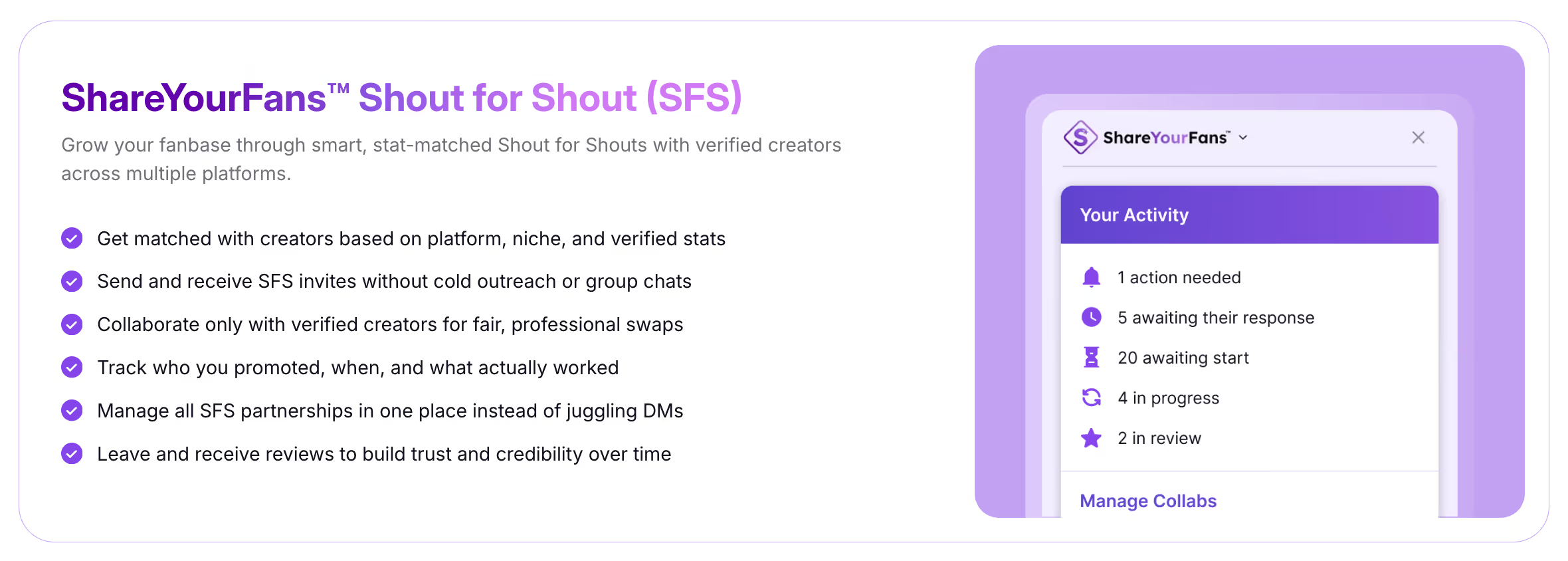
Your SFS Profile Listings Send Creators a Signal
Before we get into the specifics, let's establish an important concept: your listing status is a form of communication.
Other creators browsing the SFS Listing Directory on ShareYourFans® are making quick decisions about who to reach out to. They're looking at your stats, your niche, your requirements — and your availability. Your listing status tells them whether it's worth sending you a request right now, or whether they should move on to someone else.
This is why being intentional about your listing status matters. You're not just toggling a setting — you're shaping how the creator community perceives your availability and professionalism.
Understanding Your SFS Listing Status: Active vs. Paused vs. Not Listed
There are three possible states for your SFS presence on ShareYourFans™:
Active means your listing is live, visible in the directory, and you're open to receiving SFS requests.
Paused means your listing still exists with all your settings saved, but it's temporarily hidden from the directory. You're taking a break, not quitting.
Not Listed means you don't have an SFS profile set up on ShareYourFans® at all — you're invisible to creators searching for collaboration partners.
Each status sends a different message. Let's break down what each one communicates and when to use it.
Active SFS Listings: What They Mean and What They Signal
Setting your listing to active means you're open to SFS and want to be matched via the ShareYourFans®™ directory. This is the status you want when you're ready to collaborate and grow.
When your listing is active, other creators can find your listing and see your reviews, send you SFS requests and select dates that work for them, and match with you based on stats, niche, page strategy, and other preferences.
The key here is visibility. Set your listing to "active" when you're ready to collab and want visibility in the directory.
What Active Signals to Other Creators
An active listing tells creators several important things about you:
First, it tells them you're available. You're not overwhelmed with other commitments — you have bandwidth for new collaborations.
Second, it signals that your stats are up to date. Active creators on ShareYourFans® keep their information current, which builds trust.
Third, it indicates your SFS requirements are up to date. Creators know what to expect before reaching out.
Finally, it suggests you're likely to respond. An active listing implies you're engaged with the platform and checking your requests.
In short, an active listing says: "Yes, I'm open to collabs right now."
Paused Listings: Taking a Break Without Losing Your Setup
Paused means you're taking a break from collaborating — not quitting SFS entirely.
This is an important distinction. Pausing isn't the same as deleting your listing or abandoning the platform. It's a temporary and intentional status that gives you breathing room while preserving everything you've built.
What Happens When Your Listing Is Paused
When you pause your listing, several things happen:
Your listing is hidden from new requests. Creators browsing the directory won't see you, so you won't receive new SFS inquiries.
All your settings are saved. Your stats, requirements, niche tags, and preferences remain intact. Nothing is lost.
You can reactivate anytime. When you're ready to collaborate again, just flip the switch back to active. No need to rebuild anything.
What Paused Signals to Other Creators
A paused listing tells the creator community: "Not right now, but soon."
Creators who encounter a paused listing (perhaps they had your profile bookmarked or remembered you from a previous collab) understand that now isn't the right time to reach out. They know you're managing your workload, you're fulfilling other promo obligations first before listing again, and they should wait before requesting an SFS from you.
Pausing is temporary and intentional. Creators may pause due to taking breaks, because they're fulfilling other promo opportunities, or simply because they need to focus on content creation for a while.
The important thing is that pausing communicates professionalism. You're not ghosting anyone — you're being transparent about your availability.
Not Listed: The Hidden Cost of Being Invisible
Here's where things get interesting. If you're not listed on ShareYourFans™, you might not realize what you're missing.
Not listed means you don't have an SFS profile set up on ShareYourFans® yet. You're completely invisible to creators who are actively searching for collaboration partners.
What Creators Can't Do When You're Not Listed
When you're not listed, other creators can't find you in the SFS Listing Directory, match with you based on your stats, niche, or style, or send you structured SFS requests through the platform.
This often leads to missed opportunities. You might be an amazing creator with great engagement, but if you're not in the directory, potential collaborators don't know you exist.
What Not Listed Signals to Other Creators (Even If You Don't Mean It)
When you're not listed, creators may assume several things about you — and these assumptions might not be accurate.
They might think you're not open to SFS at all. Maybe you only do paid promotions, or maybe you're not interested in collaborations.
They might assume you don't have clear requirements. Without a listing, there's no way for them to know what you're looking for in a collab partner.
They might think you're not willing to provide your stats. Transparency is a big deal in the SFS world, and not being listed can suggest you're not comfortable sharing your numbers.
The reality is that even great creators get looked over if they're not listed. You could be a perfect match for dozens of creators in your niche — but if they can't find you, those collaborations never happen.
The ShareYourFans® Difference With SFS
At this point, you might be wondering: why does listing status matter so much on ShareYourFans® specifically?
The answer comes down to what makes ShareYourFans® SFS different from informal DM-based collaborations.
With ShareYourFans® SFS, you know that both creators are verified — no bots, no fake accounts. Stats are current and updated regularly. Listings are actively managed by creators who care about their reputation. Requirements are clear upfront, so there's no confusion about expectations. Reviews are authentic and transparent, helping you identify reliable partners. Matches are within your niche, so collaborations make sense for both audiences. And SFS requests are responded to, because the platform creates accountability.
In short: just transparent, professional SFS.
And here's the best part: ShareYourFans® SFS is a free feature for all creators. There's literally no cost to get listed, find collaboration partners, and start growing your audience through strategic shout-for-shout exchanges.
When you're active on ShareYourFans™, you're part of this ecosystem. When you're paused, you're signaling that you'll be back. When you're not listed, you're outside the system entirely — and that's a missed opportunity.
How SYF Pro Takes SFS Even Further
For creators who want to scale smarter, ShareYourFans® Pro unlocks advanced SFS tools that take your collaboration strategy to the next level.
With Pro, you can see fan overlap and audience alignment before committing to a collab. This helps you choose partners whose audiences are most likely to be interested in your content.
Pro also lets you automate SFS scheduling. Instead of going back and forth on timing, logistics, and taking screenshot proofs, the system handles the scheduling aspect so you can focus on creating.
You'll also reduce wasted promos and mismatched collabs. Better data means better decisions, which means better results from every SFS you do.
Pro turns SFS from "let's try this" into a repeatable growth system. If you're serious about using collaborations to grow your audience, Pro gives you the tools to do it efficiently and strategically.
How to Manage Your Listing Status
Managing your listing status on ShareYourFans® is simple:
Log into your ShareYourFans® account and navigate to the Shout For Shout section. From your Activity Dashboard, click "Manage Listings." Here you can toggle each listing between Active and Paused, update your stats and requirements, and review your listing's performance.
If you haven't created a listing yet, this is also where you'll set one up for the first time. The process takes just a few minutes, and once you're listed, you're immediately visible to creators searching for partners in your niche.
Strategic Tips for Managing Your Listing Status
Here are some best practices for using your listing status strategically:
Keep your listing active when you have capacity. The more consistently you're available, the more opportunities come your way. Creators remember who's reliable and responsive.
Pause proactively, not reactively. If you know you have a busy week coming up, pause your listing before you get overwhelmed with requests. It's better to pause than to leave people hanging.
Update your stats before going active. After a pause, take a moment to refresh your stats and requirements. This ensures your listing accurately reflects where you are today.
Don't stay paused too long. Extended pauses can cause you to fade from memory. If you're paused for more than a few weeks, consider whether you want to stay in the SFS game at all.
If you're not listed, get listed. There's no downside to having a listing — and it's completely free. Even if you want to be selective about collabs, being visible in the directory means opportunities come to you instead of you having to chase them.
Ready to Get Listed (or Update Yours)?
Your SFS listing status is more than a toggle — it's a signal to the creator community about your availability, professionalism, and openness to collaboration.
Whether you're setting up your first listing, reactivating after a pause, or optimizing your active listing for better matches, ShareYourFans® gives you the tools to manage your SFS presence with intention.
Visit shareyourfans.com to get listed or update your listing today.
ShareYourFans® is the platform built by creators, for creators. Our mission is to make collaboration easier, more transparent, and more effective for content creators at every level.
Run your first trackable
GG swap
Generate unique links, see real-time clicks, and prove ROI on every swap.
No card required · Free forever